 Comparison
Enscape vs Foveate
These are not competing purchases. Enscape is where you produce the rendering. Foveate is where that rendering, and everything else in the proposal, gets delivered and tracked.
At a glance
Enscape or Foveate?
The short answer, before the detail. The full comparison follows.
Enscape
Foveate
Best for
Enscape
Real-time visuals inside your modeling software
Foveate
Delivering the visuals to a client and seeing how they engage
Starting price
Enscape
From about $575/yr per user, billed annually.
Foveate
Free to start. Starter from $16/mo, billed annually.
Prices as of October 2026, from public list prices. Check the vendor's site before you buy.
01/Enscape
What is Enscape?
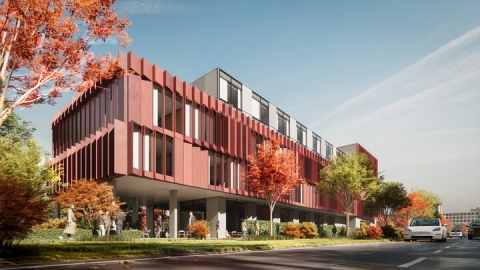
Enscape is a real-time rendering plugin that renders your model as you design, so lighting and materials update immediately. It produces stills, panoramas, and walkthrough video for your proposal.
02/Foveate
What is Foveate?
Foveate is where the visuals you produce become a proposal that wins the work. Everything sits inside one live link, tailored to what a client responds to, and reports who opened it and what held their attention.
The comparison
Enscape vs Foveate
Where each tool sits in the work of winning a project.
Capability
Enscape

Where it runs
Enscape
Desktop plugin inside your CAD or BIM application, with a GPU requirement.
Foveate
Client's web browser. Nothing to install.
Enhancing the render
Enscape
Enscape's output is the final image. Enhancement happens in other software.
Foveate
Upscale, remove backgrounds, or animate a still into video, all built in.
Primary job
Enscape
Producing visualization during design.
Foveate
Delivering a pursuit to a client and learning what they engaged with.
Web sharing
Enscape
Panorama sharing to a web link for review.
Foveate
Full interactive proposal at a link, with password and expiry controls.
Viewer analytics
Enscape
Not a rendering tool's role. No pursuit-level engagement reporting.
Foveate
Per-viewer identity, section-level dwell time, and notification on open.
Rest of the proposal
Enscape
Visual output only. The document is assembled elsewhere.
Foveate
Narrative, team, fee, schedule, forms, and PDF export in the same link.
01
What Enscape is for
- 1.1Rendering while you design, with material and lighting decisions visible in real time.
- 1.2Photorealistic stills or video for a board package, awards submission, or marketing.
- 1.3A render that updates the moment the Revit or Rhino model changes.
- 1.4Visualization without leaving your BIM authoring tool.
02
What Foveate is for
- 2.1Putting those renders in front of the client as part of a full proposal.
- 2.2Reaching an audience that will never install design software, such as lenders, board members, and procurement.
- 2.3Knowing whether the proposal was opened, by whom, and which sections held attention.
- 2.4Carrying fee, schedule, and team alongside the visuals Enscape produced.
Built to work together
Enscape produces the rendering. Foveate is where that rendering lives once it needs to reach a client, exported as a still, a walkthrough video, or a panorama and placed straight into the proposal alongside your narrative, fee, and schedule. Most firms run both, because Enscape was never meant to track who read the document it helped you build.




Questions
Frequently Asked Questions
- Can I put an Enscape render inside a Foveate proposal?
- Yes, and this is the normal way the two are used together. Export stills, panoramas, or walkthrough video from Enscape and place them directly into a Foveate proposal alongside an interactive 3D model, your narrative, fee, and schedule. Enscape produces the imagery, Foveate delivers and tracks it.
- Is Foveate a replacement for Enscape?
- No, and it is not meant to be. Enscape is a design-side rendering tool with a live link to your authoring model. Foveate is where the finished rendering gets delivered to a client and tracked. They handle different stages of the same project.
- Does Foveate connect directly to Revit or Rhino?
- No. Foveate reads glTF and GLB, so you export from Revit, Rhino, or SketchUp first. It does not maintain a live link to the authoring file the way Enscape does, because its job starts once the design is ready to present.
- Does Enscape track who viewed a shared panorama?
- Enscape's web sharing is built for design review rather than tracking a pursuit. Foveate's tracking is built around identifying individual stakeholders across a pursuit and reporting section-level engagement, which is why firms bring Enscape's output into Foveate rather than sharing it on its own.
Better clients. Higher fees. No silence after the send.
Start free with 200 credits. Pro is $39 per person a month, billed annually. Or bring a pursuit you're running now and we'll walk it through with you.