
Foveate for Proposal Managers
From RFP to finished response, without the handoffs.
Break the RFP into a compliance matrix, draft the response from your past work, score it the way the panel will, and design it in the same place.
What changes for proposal managers
No requirement slips
Every requirement lands on one checklist, and the draft is checked against it before you file.
No blank pages
Drafts start from your past projects, resumes, and proposals, not from last year's file.
No InDesign bottleneck
The team edits the deck directly in your own template, and exports the PDF the portal wants.
The whole response, in one place
From the day the RFP lands to the day you file, with the requirements, the draft, and the design in one workspace.
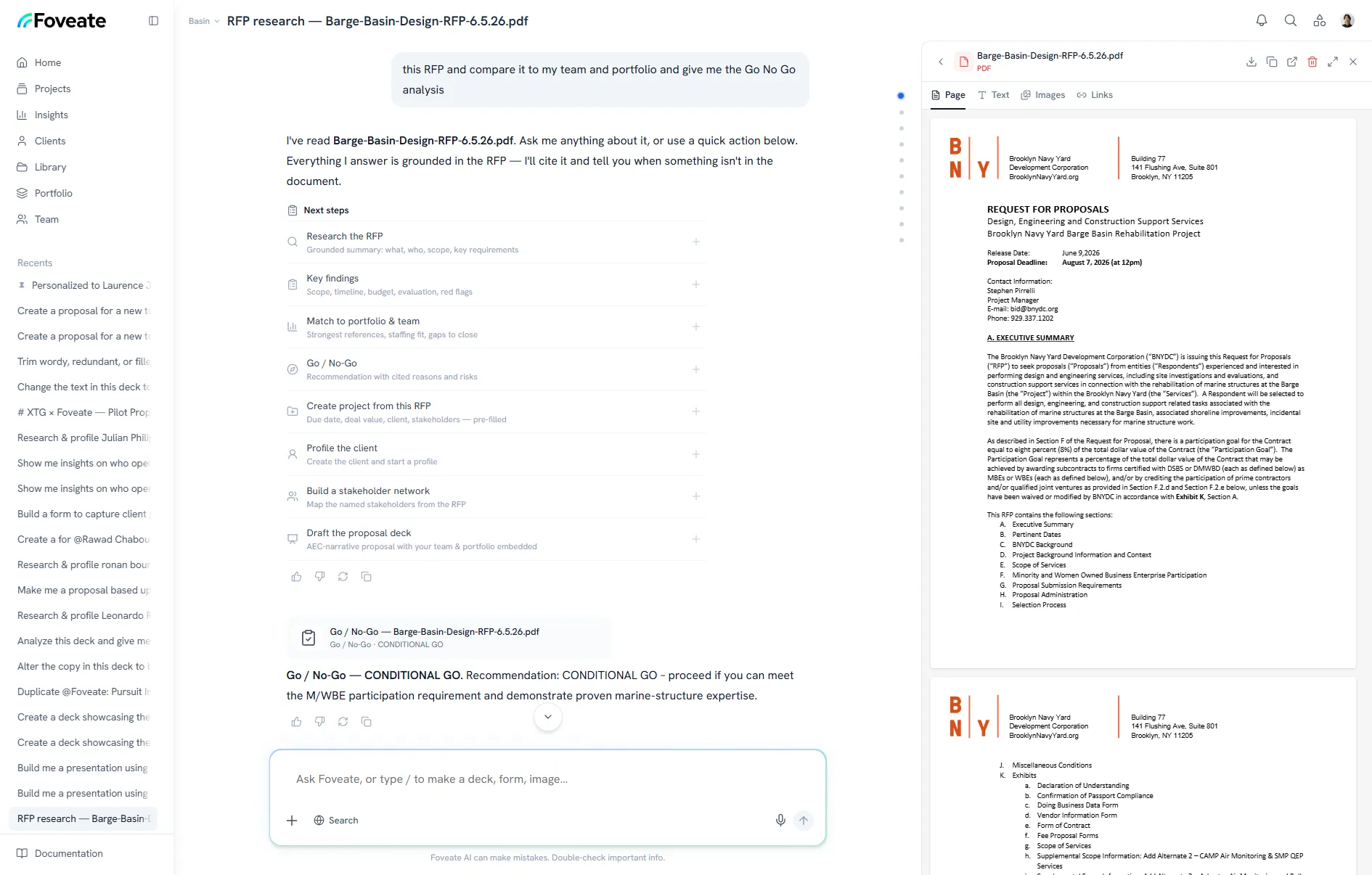
RFP Research
Break down the RFP before the kickoff.
Upload the RFP and any addenda. Foveate pulls out the scope, schedule, evaluation criteria, and every requirement into an editable compliance matrix.
- Every requirement on one checklist, with revision history
- Key findings and red flags
- A response plan built from the RFP
- Addenda in PDF or Word read alongside the RFP
Proposal drafting
Draft from work you've already done.
Foveate drafts the written response section by section from the RFP and your Studio: past projects, team resumes, and past proposals. Export it to Word when it needs a final pass.
- Sections drafted against the RFP's own requirements
- Past projects, resumes, and proposals pulled from your Studio
- A Word export for final edits
- The finished proposal filed back into Studio for next time
Compliance check
Score it the way the panel will.
Before you file, Foveate checks the draft against every requirement, marked covered, partial, or missing. Then it scores the draft using the RFP's own evaluation criteria and weights.
- Covered, partial, or missing for every requirement
- A score weighted by the RFP's criteria
- The gaps named while there's still time to fix them
No phasing dates
Nothing in the draft
Presentations and Insights
Design it, send it, see who read it.
Build the submission and the interview deck from your own templates, with your fonts, colors, and masters. Export the PDF the portal asks for, and send the live link to everyone you talk to after.
- InDesign HTML5 or PDF, PowerPoint, and Word imported as editable pages
- PDF and PowerPoint export for portals
- Opens and time on each section, per reader
- Live follow-along for the shortlist interview
 Sarah A.Decision Maker
Opened 3 times · Most time on Fee and schedule
14min Markus R.Sponsor
Opened twice, last on Tuesday · Most time on Phasing
9min Dinesh K.Influencer
First opened today · Most time on 3D walkthrough
4min
“Can we walk the board through option B before Thursday?”
Your toolkit
What proposal managers use in Foveate
RFP Research
Compliance matrix, response plan, draft, and score.
Presentations
The submission and interview deck, on brand.
Proposal Insights
Who opened it, and which sections held them.
Portfolio
Projects, team bios, and past proposals for every response.
Project Rooms
One secure room for the pursuit team and consultants.
Stakeholder Networks
The committee mapped before the interview.
Questions proposal managers ask
- Can Foveate draft the written proposal?
- Yes. It drafts the response section by section from the RFP and your Studio of past projects, resumes, and past proposals. You can export the draft to Word for a final pass.
- How does the compliance check work?
- Foveate first builds a compliance matrix of every requirement in the RFP. Before you file, it checks the draft against that matrix, marks each requirement covered, partial, or missing, and scores the draft using the RFP's own criteria and weights.
- Our submissions go through a procurement portal. Does that still work?
- Yes. Export the proposal to PDF for the portal. Use the live link for the shortlist interview, private clients, and the follow-up.
- Can we keep our InDesign templates?
- Yes. Export them from InDesign as HTML5 or PDF, and Foveate rebuilds them as editable pages. Word and PowerPoint files come in as they are.
Foveate for the rest of your team

File it complete. Know it was read.
Start free with 200 AI credits and 7 days of Pro. Bring the RFP you're working on now.